Universal / Multi-Game HubHub
Universal KillBrick and hidden surfaces ESP GUI
by Bloxive ImportsAbout this script
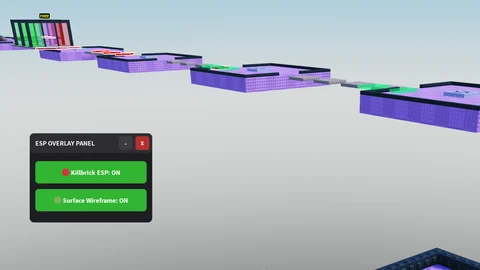
This is a simple AI-generated script that allows you to see invisible surfaces and killbricks, often useful for obby's You can use the Delete key (Del) on your keyboard to open and close the GUI. This keybind can be changed inside the script's code in the configuration section. Features: - Invisible surface ESP - Killbrick ESP - Draggable GUI - Close and Minimise buttons
Universal / Multi-Game Hub
Works across many Roblox games.
Script code
Lua-- LocalScript inside StarterPlayerScripts
local Workspace = game:GetService("Workspace")
local Players = game:GetService("Players")
local UserInputService = game:GetService("UserInputService")
local localPlayer = Players.LocalPlayer
local playerGui = localPlayer:WaitForChild("PlayerGui")
-----------------------------------------
-- CONFIGURATION
-----------------------------------------
-- Change "Delete" to any key you want (e.g., Enum.KeyCode.V)
local TOGGLE_KEY = Enum.KeyCode.Delete
-----------------------------------------
-- STATE DATA
-----------------------------------------
local killbrickESPActive = false
local surfaceESPActive = false
local isMinimized = false
-----------------------------------------
-- UI CREATION
-----------------------------------------
local screenGui = Instance.new("ScreenGui")
screenGui.Name = "ESPControlMenu"
screenGui.ResetOnSpawn = false
screenGui.Parent = playerGui
-- Main Container Frame
local mainFrame = Instance.new("Frame")
mainFrame.Name = "MainFrame"
mainFrame.Size = UDim2.new(0, 220, 0, 160)
mainFrame.Position = UDim2.new(0, 20, 0, 20)
mainFrame.BackgroundColor3 = Color3.fromRGB(30, 30, 35)
mainFrame.BorderSizePixel = 0
mainFrame.Active = true
mainFrame.Draggable = true -- Drag via title bar or main frame
mainFrame.Parent = screenGui
local uiCorner = Instance.new("UICorner")
uiCorner.CornerRadius = UDim.new(0, 8)
uiCorner.Parent = mainFrame
-- Title Banner
local titleLabel = Instance.new("TextLabel")
titleLabel.Name = "TitleLabel"
titleLabel.Size = UDim2.new(1, 0, 0, 35)
titleLabel.BackgroundColor3 = Color3.fromRGB(45, 45, 50)
titleLabel.Text = "ESP OVERLAY PANEL"
titleLabel.TextColor3 = Color3.fromRGB(240, 240, 240)
titleLabel.Font = Enum.Font.SourceSansBold
titleLabel.TextSize = 14
titleLabel.TextXAlignment = Enum.TextXAlignment.Left
titleLabel.Position = UDim2.new(0, 0, 0, 0)
titleLabel.Parent = mainFrame
-- Padding for text inside Title
local padding = Instance.new("UIPadding")
padding.PaddingLeft = UDim.new(0, 10)
padding.Parent = titleLabel
local titleCorner = Instance.new("UICorner")
titleCorner.CornerRadius = UDim.new(0, 8)
titleCorner.Parent = titleLabel
-- Minimize Button (-)
local minimizeBtn = Instance.new("TextButton")
minimizeBtn.Name = "MinimizeButton"
minimizeBtn.Size = UDim2.new(0, 25, 0, 25)
minimizeBtn.Position = UDim2.new(1, -60, 0, 5)
minimizeBtn.BackgroundColor3 = Color3.fromRGB(60, 60, 65)
minimizeBtn.Text = "-"
minimizeBtn.TextColor3 = Color3.fromRGB(240, 240, 240)
minimizeBtn.Font = Enum.Font.SourceSansBold
minimizeBtn.TextSize = 16
minimizeBtn.BorderSizePixel = 0
minimizeBtn.Parent = titleLabel
local minCorner = Instance.new("UICorner")
minCorner.CornerRadius = UDim.new(0, 4)
minCorner.Parent = minimizeBtn
-- Close Button (X)
local closeBtn = Instance.new("TextButton")
closeBtn.Name = "CloseButton"
closeBtn.Size = UDim2.new(0, 25, 0, 25)
closeBtn.Position = UDim2.new(1, -30, 0, 5)
closeBtn.BackgroundColor3 = Color3.fromRGB(180, 50, 50)
closeBtn.Text = "X"
closeBtn.TextColor3 = Color3.fromRGB(255, 255, 255)
closeBtn.Font = Enum.Font.SourceSansBold
closeBtn.TextSize = 12
closeBtn.BorderSizePixel = 0
closeBtn.Parent = titleLabel
local closeCorner = Instance.new("UICorner")
closeCorner.CornerRadius = UDim.new(0, 4)
closeCorner.Parent = closeBtn
-- Content Window (Holds the toggles so they hide when minimized)
local contentFrame = Instance.new("Frame")
contentFrame.Name = "ContentFrame"
contentFrame.Size = UDim2.new(1, 0, 1, -35)
contentFrame.Position = UDim2.new(0, 0, 0, 35)
contentFrame.BackgroundTransparency = 1
contentFrame.BorderSizePixel = 0
contentFrame.Parent = mainFrame
-- Helper function to stylize toggle buttons
local function createToggleButton(name, text, positionY)
local button = Instance.new("TextButton")
button.Name = name
button.Size = UDim2.new(1, -20, 0, 40)
button.Position = UDim2.new(0, 10, 0, positionY)
button.BackgroundColor3 = Color3.fromRGB(200, 50, 50)
button.Text = text .. ": OFF"
button.TextColor3 = Color3.fromRGB(255, 255, 255)
button.Font = Enum.Font.SourceSansBold
button.TextSize = 14
button.BorderSizePixel = 0
button.Parent = contentFrame
local btnCorner = Instance.new("UICorner")
btnCorner.CornerRadius = UDim.new(0, 6)
btnCorner.Parent = button
return button
end
local killbrickBtn = createToggleButton("KillbrickToggle", "🔴 Killbrick ESP", 15)
local surfaceBtn = createToggleButton("SurfaceToggle", "🟢 Surface Wireframe", 65)
-----------------------------------------
-- ESP RENDERING MANAGEMENT
-----------------------------------------
local function updateKillbrickESP(part)
local existing = part:FindFirstChild("KillBrickESP")
if killbrickESPActive then
if not existing then
local highlight = Instance.new("Highlight")
highlight.Name = "KillBrickESP"
highlight.FillColor = Color3.fromRGB(255, 0, 0)
highlight.FillTransparency = 0.5
highlight.OutlineColor = Color3.fromRGB(255, 255, 255)
highlight.OutlineTransparency = 0
highlight.DepthMode = Enum.HighlightDepthMode.AlwaysOnTop
highlight.Parent = part
end
else
if existing then existing:Destroy() end
end
end
local function updateSurfaceESP(part)
local existing = part:FindFirstChild("SurfaceMeshESP")
if surfaceESPActive then
if not existing then
local boxAdornment = Instance.new("BoxHandleAdornment")
boxAdornment.Name = "SurfaceMeshESP"
boxAdornment.Size = part.Size
boxAdornment.Color3 = Color3.fromRGB(0, 255, 127)
boxAdornment.Transparency = 0.4
boxAdornment.Adornee = part
boxAdornment.AlwaysOnTop = true
boxAdornment.ZIndex = 10
boxAdornment.Parent = part
end
else
if existing then existing:Destroy() end
end
end
local function runGlobalESPScan()
local character = localPlayer.Character
for _, object in pairs(Workspace:GetDescendants()) do
if object:IsA("BasePart") then
if character and object:IsDescendantOf(character) then continue end
local nameLower = string.lower(object.Name)
local hasKillScript = object:FindFirstChildOfClass("Script") or object:FindFirstChildOfClass("LocalScript")
if string.find(nameLower, "kill") or string.find(nameLower, "lava") or string.find(nameLower, "deadly") or hasKillScript then
updateKillbrickESP(object)
end
if object.Transparency >= 0.95 and object.CanCollide == true then
updateSurfaceESP(object)
end
end
end
end
-----------------------------------------
-- WINDOW INTERACTION CONTROLS
-----------------------------------------
-- Minimize functionality
minimizeBtn.MouseButton1Click:Connect(function()
isMinimized = not isMinimized
if isMinimized then
contentFrame.Visible = false
mainFrame.Size = UDim2.new(0, 220, 0, 35) -- Collapse height to title bar only
minimizeBtn.Text = "+"
else
contentFrame.Visible = true
mainFrame.Size = UDim2.new(0, 220, 0, 160) -- Expand back to normal
minimizeBtn.Text = "-"
end
end)
-- Close Button functionality
closeBtn.MouseButton1Click:Connect(function()
screenGui.Enabled = false
end)
-- Keyboard shortcut listener (Del Key)
UserInputService.InputBegan:Connect(function(input, gameProcessedEvent)
-- gameProcessedEvent prevents toggling the menu if you are currently typing in chat
if gameProcessedEvent then return end
if input.KeyCode == TOGGLE_KEY then
screenGui.Enabled = not screenGui.Enabled
end
end)
-- Toggle Actions
killbrickBtn.MouseButton1Click:Connect(function()
killbrickESPActive = not killbrickESPActive
if killbrickESPActive then
killbrickBtn.BackgroundColor3 = Color3.fromRGB(50, 180, 50)
killbrickBtn.Text = "🔴 Killbrick ESP: ON"
else
killbrickBtn.BackgroundColor3 = Color3.fromRGB(200, 50, 50)
killbrickBtn.Text = "🔴 Killbrick ESP: OFF"
end
runGlobalESPScan()
end)
surfaceBtn.MouseButton1Click:Connect(function()
surfaceESPActive = not surfaceESPActive
if surfaceESPActive then
surfaceBtn.BackgroundColor3 = Color3.fromRGB(50, 180, 50)
surfaceBtn.Text = "🟢 Surface Wireframe: ON"
else
surfaceBtn.BackgroundColor3 = Color3.fromRGB(200, 50, 50)
surfaceBtn.Text = "🟢 Surface Wireframe: OFF"
end
runGlobalESPScan()
end)
-- Continuous background streaming sweep
task.spawn(function()
while true do
task.wait(3)
runGlobalESPScan()
end
end)More for you
Steal An Egg
Lumin Hub | #1 | Working Auto Steal
- Insta Steal (Beta) - Auto Steal All - Auto Steal Selected - Global Auto Farm - Auto Return to Base - Auto Complete Index - Unequip After Index Hatch - Anti…
![Dracula HUB | Easy Key system — Roblox script for [OPE V2] Fruit Battlegrounds](https://c--5203ac31-0c19-435e-800e-18803c17ddbe-prod.lovable.cloud/storage/v1/object/sign/script-media/imports/945d723f-2a73-44af-959f-beb656d50c56/cover-3db6f6a0.png?token=eyJraWQiOiI2ODI1YTFmMS1jYjM3LTRlOTUtYjk5OC0xMDg0YzBjMzlkN2UiLCJhbGciOiJIUzUxMiJ9.eyJ1cmwiOiJzY3JpcHQtbWVkaWEvaW1wb3J0cy85NDVkNzIzZi0yYTczLTQ0YWYtOTU5Zi1iZWI2NTZkNTBjNTYvY292ZXItM2RiNmY2YTAucG5nIiwic2NvcGUiOiJkb3dubG9hZCIsImlhdCI6MTc5MTIwOTMzMiwiZXhwIjoxNzkxMjEyOTMyfQ.tayEDtEPkVOZvR2dLsJ0xzRidRZnNuAz2d51VnA-pbSIydRcVywiixD2OkDqvMmN5k-82TQnGmMU-GuQtStjpw)
[OPE V2] Fruit Battlegrounds
Dracula HUB | Easy Key system
• Auto Farm Fruit • Auto Farm Boss • Auto Boss Retreat • Auto Boss Hop • Auto Spin Fruits (Best) • Auto Respawn • Auto-Kill on Low Stamina • Auto Teleport in…

Universal Hub
Airflow HUB
this hub supports these games: Murder Mystery 2 (MM2) Animal Hospital anime dice illegal soccer sell ores fish it volleyball legends tower of hell Grow a…